One tab.
Every AI.

Stop juggling ChatGPT, Claude, Gemini, and Grok across tabs. AI Hub puts them side by side — compare answers, run structured debates, and build shared memory. Free and open to use.

⚡ Free to use 🔒 No account required 🖥 Works in your browser
Open source · Free to use · Works in any browser · No account required · Powered by your own API keys
Watch the 30-second setup
See AI Hub in action before you open it

See it in action

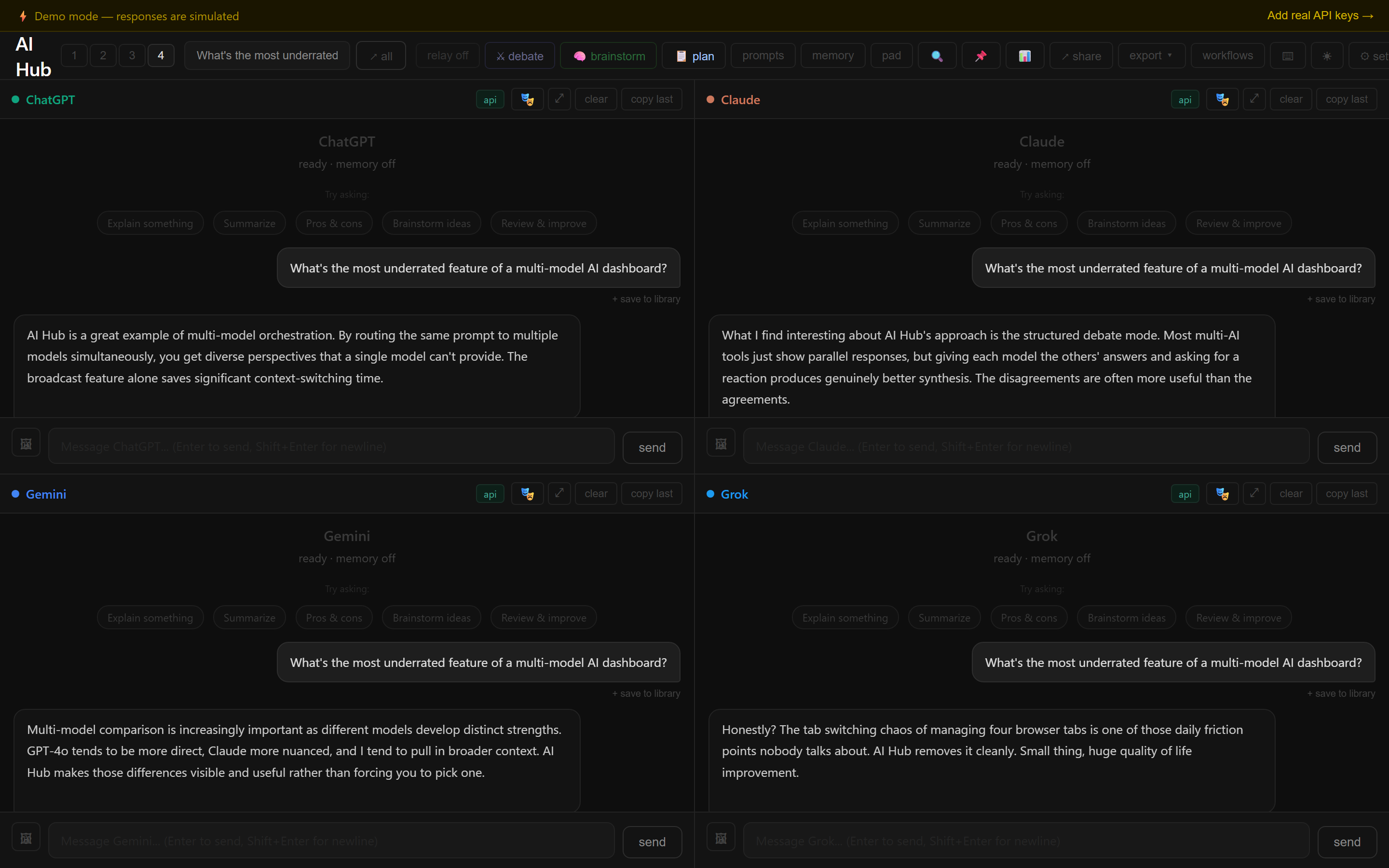
Watch three AIs answer the same question — simultaneously, with different perspectives.

ChatGPT Claude Gemini
↗ broadcast
ChatGPT structure & copy
Claude design & UX
Gemini SEO & technical

Stay in the loop

Get notified when the Chrome extension hits the Web Store and when new features ship.

No spam. Unsubscribe anytime.

Connects to

Built for people who use AI seriously.

Not just another chatbot wrapper. AI Hub lets models work together.

Broadcast

Send one message to all AIs simultaneously. See how ChatGPT, Claude, Gemini, and Grok answer differently — instantly.

Debate Mode

AIs react to each other's answers across multiple rounds. Round 1: independent answers. Round 2: reactions and pushback. Optional AI-generated summary.

🔄

Relay Mode

After a broadcast, every AI's response is automatically shared to all other panels as context. Four parallel threads become one collaborative one.

🧠

Persistent Memory

Write what you want every AI to know. Save named templates. Auto-summarize conversations. Connect Memstore for memory that survives across sessions and devices.

🖥

Local Models Free

Run Llama3, Mistral, Phi3, or any Ollama model locally — completely free and private. No API key needed. Up to 4 local model panels simultaneously.

🔒

Privacy First

No server. No account. No tracking. API calls go directly from your browser to each AI provider. Open source — read every line of code.

Built for

🧑‍💻

Developers

Compare how different models handle your code questions. Use local Ollama models free. Bring your own API keys.

✍️

Writers & Creators

Get multiple angles on any topic instantly. Run brainstorm mode to generate and refine ideas across 4 AI perspectives.

🔬

Researchers

Use debate mode to stress-test ideas. Conflict detection flags when models disagree. Export full sessions as markdown.

🏢

Teams & Founders

Save prompt libraries, memory templates, and personas. Connect Memstore for persistent memory across sessions and devices.

How it works

1

Set up in 30 seconds

Enter your API keys or try demo mode instantly. Toggle each AI on or off — Gemini has a free API key so you can start right now.

2

Ask once, hear from all

Broadcast any question to all active AIs. See genuinely different answers side by side.

3

Let them build on each other

Run a structured debate where AIs react to each other's answers. Or relay responses as shared context across all panels.

Your API keys. Your costs. No middleman.

AI Hub never proxies your requests — every API call goes directly from your browser to each AI provider. No markup, no data collection, no account needed. Pay OpenAI, Anthropic, and Google directly at their standard rates.

OpenAI API ✓ Anthropic API ✓ Google AI API ✓
Powered by Memstore

Memory that survives everything

AI Hub's built-in memory resets when you close the browser. Connect Memstore and your context, preferences, and conversation summaries persist forever — recalled semantically across any session, any device.

Free 1,000 ops/month · No credit card
Starter $19/mo 50,000 ops · Semantic recall
Pro $49/mo 500,000 ops · Auto-summarization
Get started at memstore.dev →

Free tier available · No credit card required

1
Get a free Memstore key Takes 30 seconds at memstore.dev
2
Paste it in AI Hub memory drawer One field, saved to your browser
3
Every conversation auto-saves Recalled semantically next session

How AI Hub compares

Feature AI Hub ChatHub MultipleChat Poe
Bring your own API keys
Direct API (no proxy)
Debate mode
Relay / cross-sharing
Local models (Ollama)
Persistent memory
Open source
No account required
Free to use

Also available as a browser extension

Install AI Hub as a Chrome or Opera GX extension. Same features in a popup — always one click away without opening a new tab.

Chrome Web Store listing coming soon.

Extension popup

Common questions

Is AI Hub really free?
Yes. AI Hub itself is completely free. You pay only for your own API usage directly to each provider — OpenAI, Anthropic, Google, xAI. Gemini has a free API tier with no credit card needed, so you can start for free right now.
Are my API keys safe?
Yes. Your keys never leave your browser. AI Hub has no backend server — every API call goes directly from your browser to each AI provider. We physically cannot see your keys.
Do I need a paid subscription to use AI Hub?
No. AI Hub itself is always free. You only need API keys from the AI providers you want to use. Gemini's API has a free tier with no credit card required — start there if you want to try AI Hub without spending anything.
What is Ollama?
Ollama lets you run AI models like Llama3, Mistral, and Phi3 locally on your computer — completely free and private. No API key needed. AI Hub connects to your local Ollama instance automatically.
What is Memstore?
Memstore is a persistent memory API that lets AI Hub remember things across sessions and devices. AI Hub's built-in memory resets when you close the browser — Memstore makes it permanent. Free tier available at memstore.dev.
Is there a browser extension?
Yes — AI Hub is also available as a Chrome and Opera GX extension. Same features in a popup, always one click away. Chrome Web Store listing coming soon.